pixgel: Pixel Art That Beads Together Like Mercury
A pixel art editor where pixels fuse into each other on a grid. SVG export, share-by-URL, no backend. Built around a single corner rule.
There’s a visual idiom going around — pixel grids rendered with rounded outer corners and concave inner ones, so adjacent cells fuse into one continuous shape. The Prime Intellect wordmark uses it. Retool’s logo uses it. The other day Marc Kohlbrugge was hand-drawing pixel art with the same treatment, placing each rounded rectangle and fillet piece by hand.

is there some tool to turn the left into the right? too lazy to do this by hand

The shape feels familiar because it’s pretty natural. Two wet droplets approaching each other form a meniscus that snaps closed just before they touch. Three soap films meet at curved concave junctions called Plateau borders. Ferrofluid drops grow a tight waist when they bridge under a magnet. The optical illusion when your fingertips don’t quite touch in front of a light source is the diffraction version of the same thing. The eye reads any of these as one shape — discrete bodies, fluid joint.
I built an editor for it. pixgel.d4mr.com.
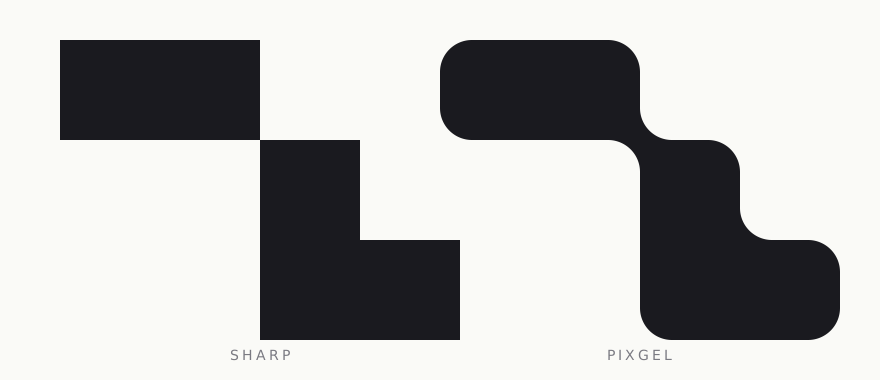
the corner rule
Every filled cell has four corners. Each corner gets one of two treatments:
- Round outward if both orthogonal neighbours are empty and the diagonal cell isn’t the same colour. Quarter-arc, convex.
- Stay sharp otherwise. The cell extends all the way into the corner so a joint can form there.
For every empty cell with two same-colour orthogonal neighbours, drop a concave quarter-arc filler in that corner. In CAD that’s called a fillet — a rounded inside corner.
const tl = Ne && We && !sameNW ? r : 0;const tr = Ne && Ee && !sameNE ? r : 0;const br = Se && Ee && !sameSE ? r : 0;const bl = Se && We && !sameSW ? r : 0;Three booleans per corner. That’s it.
the diagonal pinch
The case worth pointing at is two filled cells touching only at a single corner. The two empty cells between them each have two same-colour orthogonal neighbours, so each contributes a concave filler. The fillers meet at the shared corner. The two filled cells extend sharply into the same point. Four arcs at one pixel — that’s the pinch.
Same configuration as the soap-film junction. Drop in two more cells and you can see the surface tension.
one geometry, two outputs
Canvas preview and SVG export share a single path-string generator. The browser builds Path2D straight from SVG path data, so the same d attribute feeds both.
function roundedRect(x, y, w, h, tl, tr, br, bl): string { const parts = [`M${x + tl} ${y}`, `L${x + w - tr} ${y}`]; if (tr) parts.push(`A${tr} ${tr} 0 0 1 ${x + w} ${y + tr}`); parts.push(`L${x + w} ${y + h - br}`); if (br) parts.push(`A${br} ${br} 0 0 1 ${x + w - br} ${y + h}`); // … return parts.join(" ");}ctx.fill(new Path2D(d)) for canvas. <path d={d} fill={c} /> for export. There’s no second renderer to drift out of sync.
share by URL
The drawing serialises into a small binary blob, then through CompressionStream('deflate-raw'), then base64url, then into the URL fragment after #d=. Fragments don’t get sent to servers. The drawing is the link.
u8 versioni32 minX, minY (LE)u16 cols, rowsu8 paletteLenu8[3·N] palette (RGB)u8[cols·rows] cell indices (0 = empty, 1..N = palette + 1)The cell-index block has long runs of equal bytes — empty space, monochrome regions — which is what deflate is good at. A 32×32 drawing with 6 colours compresses to around 200 bytes, ~400 base64 characters. Well under any browser’s URL limit.
const cs = new CompressionStream("deflate-raw");const stream = new Blob([bytes]).stream().pipeThrough(cs);const compressed = new Uint8Array(await new Response(stream).arrayBuffer());return base64urlEncode(compressed);Decode is the same operation reversed.
pinch zoom
macOS turns trackpad pinch into a wheel event with ctrlKey: true. So one handler covers pinch and ⌘/⌃+scroll:
el.addEventListener("wheel", (e) => { e.preventDefault(); if (e.ctrlKey || e.metaKey) { const factor = Math.exp(-e.deltaY * 0.01); // anchor zoom to cursor } else { pan({ x: -e.deltaX, y: -e.deltaY }); }}, { passive: false });It needs to be a native listener with passive: false. React’s synthetic onWheel is passive in modern React, which means preventDefault() inside it silently does nothing and the browser zooms the page instead.
features
Infinite canvas. Cursor-anchored zoom from 5% to 20000%. Pen, eraser, fill, eyedropper, rectangle fill, rectangle erase. Adjustable blend slider — 0% gives you regular pixel art, 50% gives you the full liquid look. Minimap. Undo/redo. SVG export with configurable size, padding, and background. Share by URL.
the name
pixel + gel. Gels are soft solids that flow. To gel also means to coalesce.
Source: github.com/d4mr/pixgel. The renderer is one file, under 200 lines.
Inspired by @marckohlbrugge. If you make something with it, say hi.